
If you’ve ever lost a lead because you forgot to follow up, or spent 20 minutes hunting through emails to find a customer’s history, you already understand why businesses use a CRM. A CRM – short for Customer Relationship Management – is the software that keeps all of that information in one place and makes sure nothing slips through the cracks.
According to Salesforce’s 2025 State of Sales report, sales reps who use a CRM spend 26% less time on manual admin tasks and close deals 28% faster than those who don’t. Whether you’re a solo founder, a small business owner, or managing a team of 50, understanding what a CRM is – and whether you need one – is one of the most useful things you can do for your business in 2026.
This guide covers the CRM definition, how CRM software actually works, who needs one, what the top platforms look like, and how to choose the right one for your situation.
What Is a CRM? A Clear Definition
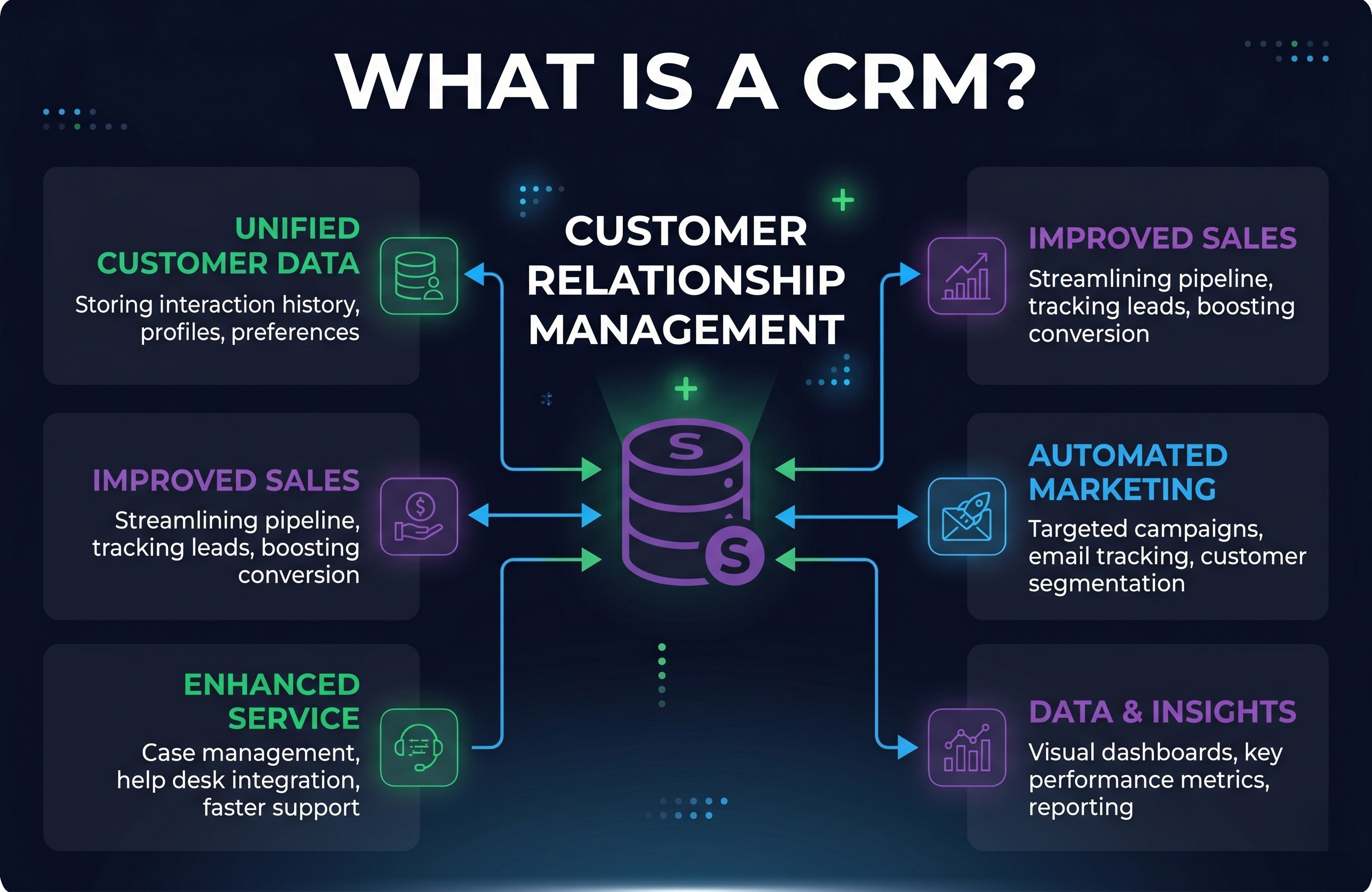
A CRM (Customer Relationship Management) system is software that helps businesses store and manage information about their customers and prospects, track interactions across email, phone, and meetings, and automate tasks like follow-ups and reminders – all in one centralised platform.
In plain terms: a CRM is your business’s memory. Every time a salesperson calls a prospect, every email that gets sent, every deal that moves forward – a CRM records it and makes it available to anyone on your team who needs it.
Before CRM software existed, businesses tracked customer relationships in spreadsheets, notebooks, or just their heads. That worked when companies were tiny. As teams and customer bases grew, it stopped working. A CRM solves the problem by replacing scattered, siloed information with a single source of truth that your entire team can access, update, and act on.
Today, the CRM market is vast. Tools range from free options like HubSpot CRM to enterprise platforms like Salesforce. Our best CRM software guide covers the top options in detail.
How Does CRM Software Work?
A CRM works by connecting the different touchpoints of your customer relationships – emails, calls, meetings, deals, support tickets – and pulling them into a unified contact record. Here’s what happens in practice:
Contact Management
Every person or company your business deals with gets a record in the CRM. That record holds their name, email, phone number, company, job title, and a full timeline of every interaction you’ve had with them – emails, calls, meetings, and notes. Instead of digging through your inbox, you open the contact record and see everything at a glance.
Pipeline & Deal Tracking
Sales teams use CRMs to track deals through a visual pipeline – typically a set of stages like “Lead”, “Qualified”, “Proposal Sent”, “Negotiation”, and “Won/Lost”. You can see at any moment where each deal stands, which ones are stalling, and where your team should focus their energy.
Email & Communication Sync
Most modern CRMs connect directly to Gmail or Outlook. When you send or receive an email with a contact, it automatically logs against their record. Some CRMs also track whether the recipient opened your email – giving sales reps useful context before they follow up.
Automation & Reminders
CRMs automate repetitive tasks: sending a follow-up email three days after a demo, assigning a new lead to the right salesperson, or reminding a rep to check in with a prospect who’s gone quiet. This is where CRM software pays for itself – the hours saved on manual admin add up quickly.
Reporting & Forecasting
CRM dashboards give managers a real-time view of team performance: how many deals are in the pipeline, which reps are hitting their targets, and what the likely revenue is for the next quarter. This data replaces gut-feel forecasting with something more reliable.
What Are the Different Types of CRM?
Not all CRMs are built the same way. In 2026, there are three main categories:
1. Operational CRM
Focuses on automating and streamlining day-to-day sales, marketing, and service processes. Best for teams that want to reduce manual work and improve workflow efficiency. HubSpot and Pipedrive are strong examples.
2. Analytical CRM
Focuses on data analysis – helping businesses understand customer behaviour, identify trends, and make better strategic decisions. Often used by larger organisations with dedicated data or BI teams. Salesforce has deep analytical CRM capabilities.
3. Collaborative CRM
Designed to improve communication and information sharing across departments – particularly between sales, marketing, and customer service. Ensures that every team has the same up-to-date view of a customer, regardless of which department they interacted with last.
Most modern platforms blend all three. For most small and mid-sized businesses, an operational CRM is the right starting point.
Do I Need a CRM? Signs It’s Time to Get One
A CRM isn’t always necessary on day one. But here are the signs that it’s time to make the switch:
- You’re managing leads or clients in spreadsheets and things keep slipping through the cracks
- Your team doesn’t have a shared view of customer conversations and deal history
- You can’t reliably forecast how much revenue is coming in next month
- Follow-ups happen inconsistently – or not at all – because there’s no system
- You’re spending more than an hour a week on admin that software could handle
- Your team has grown past 2–3 people and handoffs are becoming messy
If two or more of these apply to your business, a CRM will pay for itself quickly – especially given how many good free options exist. HubSpot CRM, for instance, is genuinely free for unlimited users with no time limit.
For more information, please read our article on how to choose a CRM.
CRM Software Examples: The Top Platforms in 2026
To make the concept concrete, here’s a quick comparison of the most widely used CRM platforms in 2026:
| CRM Platform | Free Plan | Starting Price | Best For | Notable Feature |
|---|---|---|---|---|
| HubSpot CRM | ✅ Yes (unlimited users) | Free / ~$20/user | All-in-one teams | Breeze AI + Marketing Hub |
| Salesforce | ❌ No | ~$25/user/mo | Enterprise | Deep customisation |
| Pipedrive | ❌ No | ~$14/user/mo | Sales-focused SMBs | Visual pipeline |
| GoHighLevel | ✅ 14-day trial | ~$97/mo (flat) | Agencies & white-label | White-label platform |
| Monday CRM | ✅ Limited | ~$12/user/mo | Project-sales hybrid | Flexible board view |
For a deeper look at each platform, see our GoHighLevel CRM review or the full best CRM software roundup.
Frequently Asked Questions: What Is a CRM?
What does CRM stand for?
CRM stands for Customer Relationship Management. The term refers both to the strategy of managing customer relationships and to the software platforms that help businesses do it. In everyday usage, “a CRM” almost always refers to the software.
What is the difference between a CRM and a spreadsheet?
A spreadsheet can store contact information, but it can’t track email conversations, automate follow-ups, show a visual sales pipeline, or give your whole team a shared, real-time view of a customer’s history. A CRM does all of those things automatically. Most businesses outgrow spreadsheets once they have more than 50 to 100 active contacts or a team of two or more people managing relationships.
Is CRM software only for sales teams?
No. While CRMs originated in sales, modern platforms serve marketing teams (lead capture, email campaigns, segmentation), customer service teams (support ticket management, customer history), and operations teams (workflow automation, reporting). Platforms like HubSpot bundle all of these into a single tool, making a CRM relevant across the entire customer-facing side of a business.
How much does a CRM cost?
CRM pricing in 2026 ranges from completely free (HubSpot’s free plan, for example, has no time limit and supports unlimited users) to thousands of pounds/dollars per month for enterprise platforms like Salesforce. For most small businesses, a capable CRM is available for £15–25/user/month. Many platforms offer 14-day free trials, so you can test before committing.
What is a CRM used for in a small business?
In a small business, a CRM is typically used to: keep all customer and prospect information in one place, track where each deal stands in the sales process, automate follow-up emails and reminders, give the whole team a shared view of customer history, and report on sales performance. For most small businesses, the free plan from HubSpot CRM is the easiest place to start.
Summary: What Is a CRM and Should You Get One?
A CRM is the central hub for your customer relationships – a system that stores every contact, logs every interaction, tracks every deal, and automates the tasks that would otherwise fall through the cracks.
For businesses still managing relationships in spreadsheets or scattered email threads, a CRM is one of the highest-return tools you can adopt. The free plans available in 2026 make it easy to get started without any financial commitment – and the time saved on admin typically justifies a paid plan within weeks of adoption.
If you’re ready to pick a platform, our how to choose a CRM guide walks you through exactly what to look for based on your team size and budget. Or, if you already have a shortlist, see our full best CRM software comparison.
Ready to try your first CRM?
HubSpot CRM is free to use with no time limit – no credit card required. It’s the easiest way to experience a modern CRM without any financial commitment. Set-up takes under 10 minutes.
Visit our website LatestCRMs for more articles.