
With hundreds of CRM platforms on the market in 2026, knowing how to choose a CRM that genuinely fits your business – rather than one you’ll outgrow or abandon in six months – is harder than it should be. Most buyers pick based on brand familiarity or a colleague’s recommendation, without ever checking whether the platform matches their actual workflow.
According to Gartner’s 2025 CRM Market Guide, 47% of CRM implementations fail to meet their original objectives – and the most common reason is a mismatch between the platform’s strengths and the buyer’s actual use case. Choosing the wrong CRM doesn’t just cost money. It costs time, adoption, and momentum.
This buying guide gives you a clear, practical framework for evaluating CRM software in 2026: what to look for, what questions to ask, and how to match a platform to your team size, industry, and growth plans. If you’re new to CRM, start with our what is a CRM guide first.
How to Choose a CRM: A 5-Step Framework
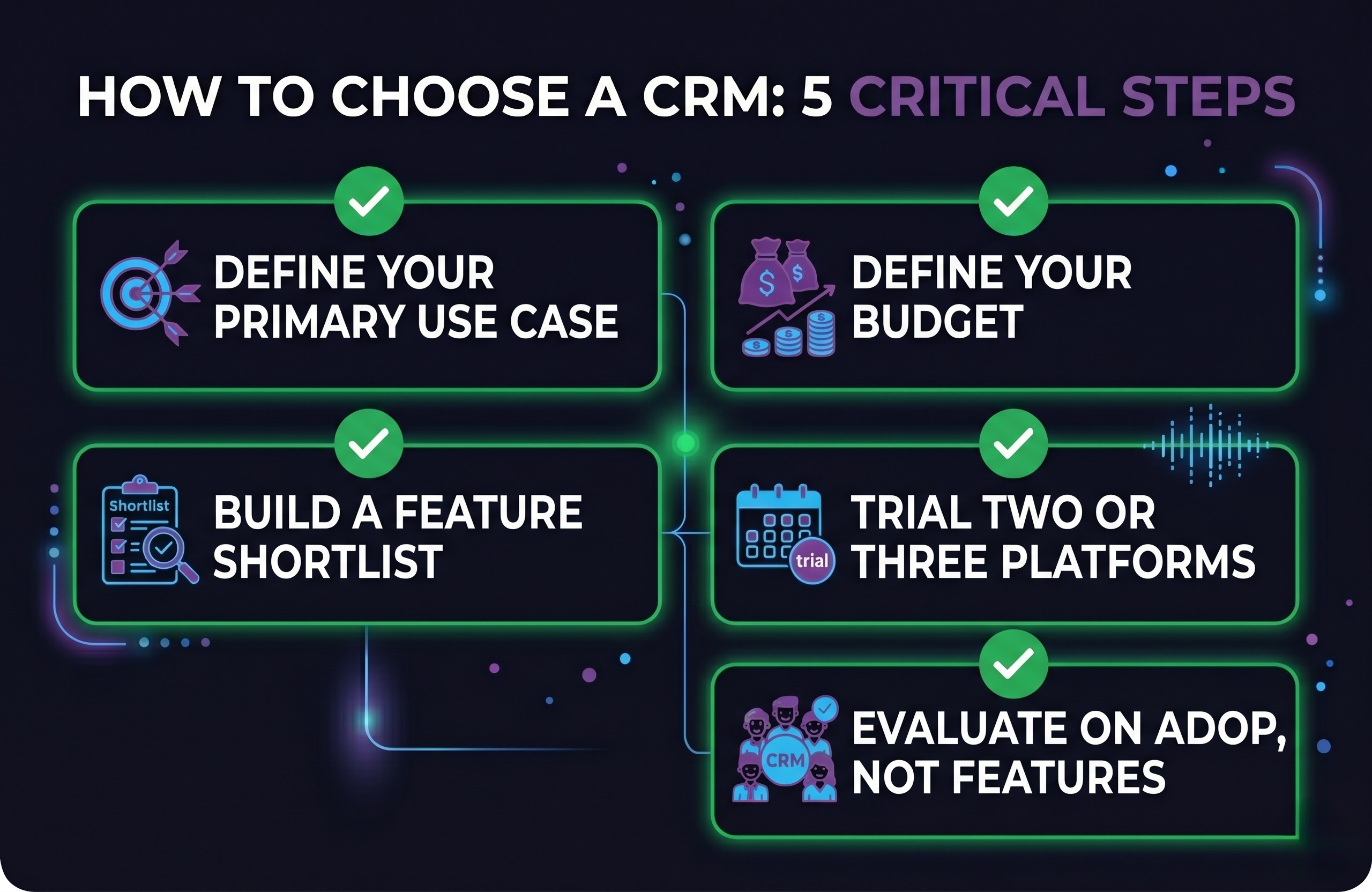
Choosing a CRM comes down to five steps: define your use case, set your budget, shortlist platforms by feature fit, trial the top two or three options, and evaluate based on real-world usage – not demos.
The five steps below give you a repeatable process for making this decision with confidence, whether you’re a solo founder, a five-person sales team, or a growing agency.
Step 1: Define Your Primary Use Case
Before you open a single CRM comparison page, get clear on what you actually need the platform to do. The three most common CRM use cases are sales pipeline management (tracking deals from lead to close), marketing automation (email sequences, lead scoring, campaign tracking), and client or account management (ongoing relationship tracking after the sale).
Most CRMs are built around one of these – even if they claim to cover all three. HubSpot leans marketing-first. Pipedrive leans sales-first. GoHighLevel is built specifically for agencies that need all three in a white-label environment. Knowing your primary use case narrows the field significantly.
Step 2: Define Your Budget
CRM pricing in 2026 ranges from free (HubSpot’s free plan) to enterprise contracts worth thousands per month. The more useful question is: what is a realistic monthly budget per user, and does the platform’s pricing scale reasonably as your team grows? Watch out for platforms that appear affordable at three users but double in cost when you hit ten.
Step 3: Build a Feature Shortlist
Rather than trying to match every feature a vendor offers, start with your must-haves. We cover the key features to evaluate in detail in the next section.
Step 4: Trial Two or Three Platforms
Most CRMs offer a 14-day free trial or a free tier. Use this time deliberately: import a sample of your real contacts, run a mock deal through the pipeline, and get at least two team members to use it daily for a week. Demos are curated – real-world usage is where problems surface.
Step 5: Evaluate on Adoption, Not Features
The best CRM is the one your team will actually use. A feature-rich platform that confuses your team will underperform a simpler tool they adopt fully. After your trial, ask: did your team navigate it without training? Did they log activities consistently? Adoption rate in the trial period is your strongest signal.
Key CRM Features to Evaluate in 2026
Not all CRM features are created equal. Here are the ones that matter most in 2026, grouped by business need:
Contact & Pipeline Management
- Unlimited or generous contact limits (free tiers vary significantly)
- Visual deal pipeline with customisable stages
- Activity timeline showing all emails, calls, and notes per contact
- Custom fields to capture industry-specific data
Automation & Workflow
- Email sequences and follow-up automation (when does it trigger? how many steps?)
- Task and reminder automation for sales reps
- Lead assignment rules (auto-routing to the right team member)
- Workflow builder for multi-step automations without code
Integrations
- Native email sync (Gmail / Outlook) – this should be seamless, not a workaround
- Calendar integration for meeting scheduling
- Zapier or native API for connecting other tools in your stack
- Website or landing page integration for lead capture
Reporting & Visibility
- Pipeline value and deal velocity reporting
- Team activity reports (calls made, emails sent, deals moved)
- Revenue forecasting with confidence weighting
White-Label & Agency Features (if applicable)
If you’re an agency managing CRM on behalf of clients, standard CRM platforms are often a poor fit. You’ll want features like multi-account management, sub-account separation, white-label branding, and client-facing portals. GoHighLevel was purpose-built for this use case – see our GoHighLevel CRM review for a full breakdown.
How to Choose a CRM Based on Your Business Type
The right CRM varies significantly depending on your business model. Here’s a quick framework by business type:
| Business Type | Primary Need | Key Feature to Check | CRM to Consider |
|---|---|---|---|
| Solo founder / freelancer | Simple contact tracking | Free plan, ease of use | HubSpot Free |
| Small sales team (2–10) | Pipeline + email automation | Sequences, pipeline stages | Pipedrive / HubSpot Starter |
| Marketing-led business | Lead nurture + campaigns | Email builder, list segmentation | HubSpot Marketing Hub |
| Agency / white-label | Multi-client management | Sub-accounts, white-label UI | GoHighLevel |
| Enterprise / complex ops | Deep customisation + reporting | Custom objects, API, forecasting | Salesforce |
For agencies in particular, GoHighLevel deserves serious consideration. Its flat-rate pricing (~$97/mo for unlimited client sub-accounts) makes it far more cost-effective than per-user platforms once you manage more than three to four clients. Read our best CRM for small businesses guide for a detailed comparison.
10 Questions to Ask Before Choosing a CRM
Use these questions during your evaluation process. They’re designed to surface the things vendor demos and feature comparison pages won’t show you:
- How many contacts and users does the plan I’m considering support, and what happens when I exceed those limits?
- Is email sync automatic and two-way, or do I need to BCC a special address to log emails?
- Can I build automation workflows without technical help, or does it require developer input?
- What does the mobile app look like, and will my team actually use it on the go?
- How does pricing scale? If I add five more users in 12 months, what does that cost?
- What are the most common complaints from existing users? (Check G2, Capterra, and Reddit – not just the vendor site.)
- Is there a data export option? If we need to leave, can we take our data with us easily?
- What level of onboarding and support is included at my plan tier?
- Does the platform support the integrations my existing tools require (accounting, project management, communication)?
- For agencies: can I manage multiple client accounts from one login, and can I white-label the interface?
Common CRM Buying Mistakes to Avoid
In our experience reviewing and testing CRM platforms, these are the mistakes that most commonly lead to failed implementations:
Choosing Based on Brand Name Alone
Salesforce is the market leader for a reason – but it’s built for enterprise complexity. A 10-person team adopting Salesforce will spend more time configuring it than using it. Match the platform to your actual stage of growth, not the biggest name you’ve heard.
Underestimating the Total Cost
The per-user price on the pricing page is rarely the full picture. Factor in onboarding fees, add-on costs for specific features, and the staff time required to set up and maintain the platform. A “cheap” CRM that requires a consultant to configure it may cost more than a premium platform with better out-of-the-box functionality.
Skipping the Team Trial
Many CRM decisions are made by a manager or founder who never becomes a daily user. Before committing, get the people who will actually use the platform – sales reps, account managers, support staff – to trial it for at least a week. Their feedback will reveal adoption blockers that no demo ever will.
Ignoring Migration Complexity
Moving from one CRM to another (or from spreadsheets) is rarely seamless. Before you commit to a platform, ask: how do I get my existing data in, and how do I get it out if I need to switch later? Platforms that make data export difficult are a red flag.
Frequently Asked Questions: How to Choose a CRM
What is the most important factor when choosing a CRM?
The single most important factor is team adoption. A CRM only delivers value if your team uses it consistently. This means the interface must be intuitive enough for daily use without significant training, and the workflow must match how your team already works – not force them to change their behaviour to fit the software.
How long does it take to implement a CRM?
For a small business using a cloud-based CRM like GoHighLevel or HubSpot, basic setup – importing contacts, building your pipeline, and connecting email – typically takes one to three days. Full adoption, including team training and workflow automation, usually takes two to four weeks. Enterprise implementations on platforms like Salesforce can take months and often require external consultants.
Should I choose a free CRM or a paid one?
Start with a free plan if you’re unsure what you need or if your team is small. HubSpot’s free CRM is genuinely capable for basic contact and pipeline management. Upgrade to a paid plan when you hit specific limitations – typically automation, reporting, or user limits. Don’t pay for features you haven’t validated you need yet.
Is GoHighLevel a good CRM for agencies?
GoHighLevel is one of the strongest CRM options available for agencies in 2026. Its flat-rate pricing model, white-label capabilities, multi-client sub-account structure, and built-in marketing automation tools make it unusually well-suited to agency workflows. For a detailed assessment, read our GoHighLevel CRM review.
How do I know when it’s time to switch CRMs?
Key signs it’s time to switch: your team has stopped logging activities because the platform is too clunky, you’re working around the CRM rather than inside it, pricing has escalated as you’ve grown and the value no longer justifies the cost, or you’ve outgrown the platform’s customisation limits. Before switching, check whether a plan upgrade or configuration change would solve the problem – migrations are costly.
Summary: How to Choose the Right CRM for Your Business
The right approach to choosing a CRM is not to find the platform with the most features – it’s to find the platform whose strengths align with your primary use case, your team’s working style, and your growth trajectory.
For most small businesses and sales teams, the priority order is: ease of adoption, core pipeline and email functionality, automation that saves time without requiring a developer, and pricing that doesn’t penalise growth. For agencies, the requirements are different – white-labelling, multi-account management, and flat-rate pricing take priority.
Use the 5-step framework and 10 evaluation questions in this guide to make a structured decision. If you’re still not sure where to start, our GoHighLevel CRM review is a good next read – particularly if you’re running or scaling an agency.
Our top pick for agencies: GoHighLevel
After testing the leading CRM platforms, GoHighLevel consistently stood out for agencies and growing teams that need white-label CRM, marketing automation, and multi-client management under one flat-rate plan. Start your 14-day free trial – no credit card required.
Visit our website LatestCRMs for more articles.
Affiliate Disclosure
This post may contain affiliate links. I may earn a small commission at no extra cost to you if you purchase through them.